Heyhai Script: A Polished Typeface for Small Business Branding
The afternoon sun was hitting the counter of my local café just right when I realized something was off. The coffee tasted perfect, the pastries were fresh, but the new menu boards felt cold. They were clean, yes, but they lacked soul. As a creative consultant who helps small businesses refine their visual identity, I know that feeling well. It is the gap between having a product and having a brand. That day, I went back to my studio and started testing Heyhai Script, a magical script font that promises elegance without sacrificing usability. What followed was not just a typography test, but a lesson in how the right typeface can transform customer perception.
First Impressions Matter More Than You Think
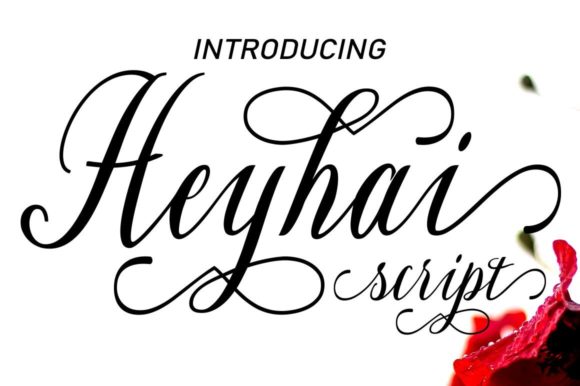
In the world of brand identity, typography is often the unsung hero. While logos get all the attention, it is the font you use on your packaging, social media graphics, and website banners that creates consistency. Heyhai Script belongs to the Script Amp collection, and it stands out because it balances fluidity with structure. It does not look like a messy scrawl; instead, it resembles the confident stroke of a professional calligrapher.
When I applied this premium font to a mockup for a boutique candle label, the difference was immediate. The previous design used a standard system font that felt generic. Heyhai Script added a layer of sophistication. It suggested that the product inside was handmade with care. For small business owners, this is crucial. Customers often judge the quality of a product by its presentation before they even touch it. A polished typeface signals trustworthiness and attention to detail.
Versatility Across Real-World Applications
One of the biggest challenges for entrepreneurs is maintaining a cohesive look across different mediums. You need a font that works on a tiny skincare label and a large Instagram banner. Heyhai Script proves to be remarkably versatile. I tested it across several common business assets:
- Packaging Design: On a bakery box, the font’s swashes added a decorative touch that made the package feel like a gift.
- Social Media Graphics: For quote cards and promotional posts, the elegant curves drew the eye without overwhelming the message.
- Thank-You Cards: Printed on thick cardstock, the font retained its clarity, adding a personal, handwritten feel to automated orders.
- Website Banners: As a display element, it created a strong focal point against clean, minimalist backgrounds.
This versatility makes it an excellent choice for anyone building a comprehensive design assets library. Whether you are a handmade seller updating Etsy tags or a coach refreshing your slide decks, this creative font adapts to the context while keeping your brand recognizable.
The Technical Edge: Why PUA Encoding Changes Everything
Let us talk about usability, because beauty means nothing if the font is a nightmare to work with. Many beautiful script fonts require complex keyboard shortcuts or external software to access special characters. Heyhai Script is PUA encoded. For non-designers, this is a game-changer. PUA (Private Use Area) encoding means you can access all the glyphs, ligatures, and swashes directly from your character map or glyph panel in standard design software.
I spent an hour designing a flyer for a local florist. With other fonts, I would have struggled to connect letters naturally or add decorative flourishes. With Heyhai Script, I could easily swap out alternate letterforms to avoid awkward collisions. This ease of access allows business owners to create professional-looking editorial design pieces without needing a degree in graphic design. It empowers you to tweak and perfect your layout until it feels just right.
Pairing and Readability: Best Practices for Non-Designers
While Heyhai Script is stunning, it is a script font, which means it should be used strategically. It is not designed for long paragraphs of body text. Instead, treat it as a spice. Use it for headlines, short phrases, logos, and decorative accents. To ensure your designs remain readable and balanced, pair it with a clean sans serif font or a classic serif font.
For example, if you are designing a menu, use Heyhai Script for the section headers like "Starters" or "Desserts," but use a simple, legible sans serif for the item descriptions and prices. This contrast creates visual hierarchy. It guides the customer’s eye through the content without causing fatigue. On mobile screens, where space is limited, keep the script size large enough to be legible. Avoid using it for fine print on small labels, as the intricate details may blur when printed at a tiny scale.
Smart Pairing Ideas
- Modern Minimalist: Pair Heyhai Script with a geometric sans serif for a contemporary, clean look ideal for tech startups or modern boutiques.
- Classic Elegance: Combine it with a high-contrast serif font for a luxury feel, perfect for jewelry brands or high-end skincare.
- Rustic Charm: Use it alongside a simple, rounded handwritten font for a friendly, approachable vibe suitable for bakeries or craft shops.
Making the Investment in Your Brand
Before you download any commercial font, always check the licensing terms. Heyhai Script is designed for professional use, but ensuring you have the right license for your specific needs—whether it is for physical products, digital downloads, or client work—is essential. Look at the included file formats to ensure compatibility with your preferred design tools. Most modern workflows support OpenType features, which unlock the full potential of the font’s alternates and ligatures.
Investing in a high-quality display font like Heyhai Script is an investment in your brand’s longevity. It helps you stand out in a crowded market. When your Instagram thumbnails, product labels, and business cards all share the same elegant typographic voice, you build recognition. Customers begin to associate that specific style of writing with your quality and values.
In the end, the café menu was updated. We used Heyhai Script for the daily specials board, paired with a crisp sans serif for the prices. The result was warm, inviting, and undeniably professional. It did not just list coffee; it told a story. For any small business owner looking to elevate their visual presence, this modern typography tool offers the perfect blend of magic and practicality. It is not just about choosing a font; it is about choosing how you want your business to be seen.